Integrators
How do I obtain an OpenAPI-compliant description of the services provided by OPAL?
<p>You can obtain an OpenAPI-compliant description of the services provided by OPAL from the following URLs: <a href="https://linkeddata.uriburner.com/chat/api/openapi.yaml">https://linkeddata.uriburner.com/chat/api/openapi.yaml</a> for YAML representation and <a href="https://linkeddata.uriburner.com/chat/api/openapi.json">https://linkeddata.uriburner.com/chat/api/openapi.json</a> for JSON representation.</p>
Integrators
How do I obtain an OpenAPI-compliant description of various OPAL instance Modules?
<p>You can obtain an OpenAPI-compliant description of various OPAL instance Modules (e.g., OpenLink, Virtuoso, UDA, and Data Twingler Assistants/Bots) from the following URLs: <a href="https://linkeddata.uriburner.com/chat/functions/openapi.yaml">https://linkeddata.uriburner.com/chat/functions/openapi.yaml</a> for YAML representation and <a href="https://linkeddata.uriburner.com/chat/functions/openapi.json">https://linkeddata.uriburner.com/chat/functions/openapi.json</a> for JSON representation.</p>
Integrators
How do I enable new unofficially released models (e.g., GPT-4 Turbo)?
<p>You can enable new unofficially released models (e.g., GPT-4 Turbo) by running the following command via iSQL: <code>OAI.DBA.FILL_CHAT_MODELS('[apiKey]')</code></p>
Integrators
How do I drop specific models from the list e.g., those that start with 'ft:gpt'?
<p>You can drop specific models from the list by running the following command via iSQL: <code>UPDATE OAI.DBA.CHAT_MODELS SET CM_DEPRECATED = 1 where CM_NAME like 'ft:gpt-%';</code></p>
Integrators
How do I obtain an OPAL API Key for Client App/Service connectivity use?
<p>You can obtain an OPAL API Key for Client App/Service connectivity use by visiting <a href="https://linkeddata.uriburner.com/oauth/applications.vsp">https://linkeddata.uriburner.com/oauth/applications.vsp</a>; authenticate, and then register by entering your client app/service name and description.</p>
Integrators
How do I list OpenAI keys in the Virtuoso Registry?
<p>You can list OpenAI keys in the Virtuoso Registry by running the following SQL command: <code>SELECT registry_get('openai-chat-app-key', 'none');</code></p>
Integrators
How do I change the label of the Single Page Application that hosts the OPAL.js Widget, when authenticating using VALâs OpenIDConnect implementation?
<p>You can change the label of the Single Page Application that hosts the OPAL.js Widget by editing the following JavaScript code snippet, which handles OpenIDConnect authentication, in your Single Page Application client:</p>
```javascript
async function authLogin() {
let url = new URL(window.location.href).toString();
authClient.login({
oidcIssuer: baseUrl,
redirectUrl: url,
tokenType: 'DPoP',
clientName: 'OpenLink Demo'
});
}
```
End Users
What is OPAL?
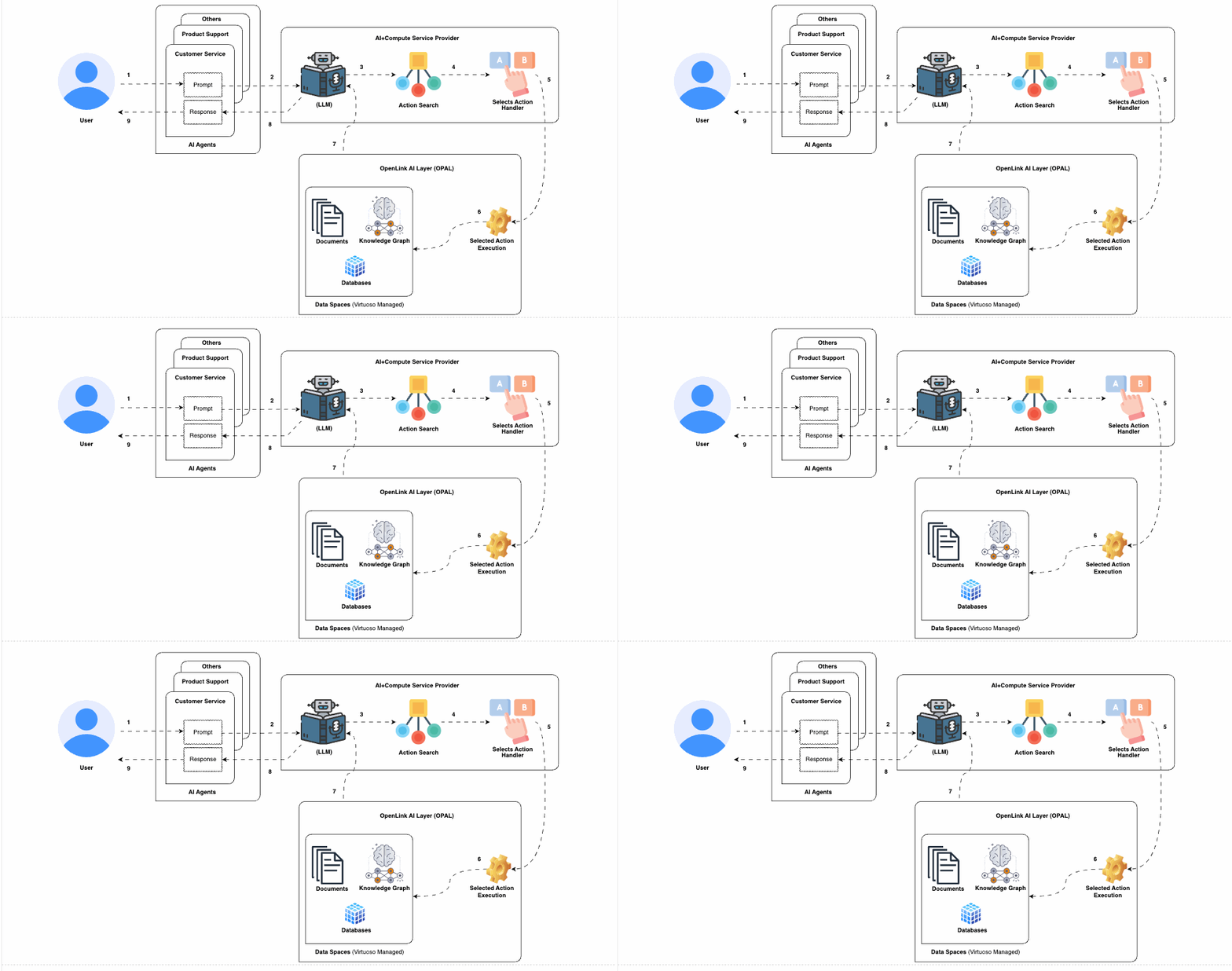
<p>OPAL (OpenLink AI Layer) is a powerful AI-oriented middleware layer that enables the creation, deployment, and use of Smart Agents. It achieves this by loosely coupling Large Language Models (LLMs), OpenAPI-compliant Web Services, and Data Spaces, which include databases, knowledgebases, knowledge graphs, and file systems.</p>
End Users
What is the OpenLink AI Layer (OPAL)?
<p>OPAL is a service hosted on Virtuoso, integrating ChatGPT with additional services for a comprehensive smart agent experience. It supports natural language interactions, offering an enriched Large Language Model (LLM)-based interface for users.</p>
End Users
How does OPAL enhance AI model responses?
<p>OPAL includes a built-in Retrieval Augmented Generation (RAG) feature, also known as GraphRAG. This feature enhances LLM response specificity by providing high-performance access to external databases and knowledge graphs using declarative query languages such as SQL, SPARQL, SPASQL, and GraphQL.</p>
End Users
How does OPAL handle session logs?
<p>OPAL provides exportable and importable session logs, which aids in session sharing, analysis, and troubleshooting.</p>
End Users
Can sessions, prompts, and responses be shared in OPAL?
<p>Yes, OPAL allows the sharing of session transcripts, individual prompts, and responses via hyperlinks, facilitating future reuse and recall.</p>
End Users
How do I replay a session in animated playback mode?
<p>Add the <code>&t</code> parameter to a permalink, just before the <code>#</code> fragment identifier. Example: <a href="http://netid-qa.openlinksw.com:8443/chat/?chat_id=s-2ooxbBh4WrhnXRjStCr6pgjYb2EjsUoFM4Ws7wpZZ8zC&t=30#asi-12719">http://netid-qa.openlinksw.com:8443/chat/?chat_id=s-2ooxbBh4WrhnXRjStCr6pgjYb2EjsUoFM4Ws7wpZZ8zC&t=30#asi-12719</a></p>
End Users
How do I know what identities have been used in successful OPAL connections?
<p>Execute the following SPARQL query: <code>SELECT ?s FROM urn:chat:users WHERE { ?s foaf:nick [] }</code></p>
End Users
How do I interact with OPAL using natural language?
<p>OPAL supports natural language interactions through its integration with LLMs like ChatGPT. You can ask questions, give commands, and interact with Smart Agents as if you were conversing with a human assistant.</p>
End Users
What are Smart Agents and how do they work in OPAL?
<p>Smart Agents in OPAL are advanced AI assistants that use LLMs to understand and respond to user queries. They can access and process data from various data spaces, providing relevant and accurate information or actions.</p>
End Users
Can I personalize the behavior of Smart Agents?
<p>Yes, Smart Agents can be personalized through custom configurations and fine-tuning templates, allowing them to better meet individual user needs and preferences.</p>
End Users
How do I troubleshoot issues with Smart Agents?
<p>For troubleshooting, you can export and analyze session logs, consult OPALâÂÂs documentation, or reach out to support. Detailed logs help in identifying and resolving issues.</p>
End Users
What kind of data sources can OPAL connect to?
<p>OPAL can connect to a wide range of data sources including databases, knowledgebases, knowledge graphs, and file systems. It supports standard protocols like HTTP, ODBC, and JDBC for data access and connectivity.</p>
End Users
How can OPAL assist with customer, partner, and prospect support?
<p>OPAL offers new solutions that leverage direct conversational interactions with product support knowledge usually held captive by monolithic applications or websites. This enables direct access to relevant information with precision, the ability to perform actions like opening a support ticket, and sharing sessions via hyperlinks.</p>
End Users
How can OPAL assist with customer, partner, and prospect sales?
<p>OPAL provides solutions that leverage direct conversational interactions with product sales-related knowledge, offering direct access to relevant sales information, the ability to perform actions like purchasing offers, and sharing sessions via hyperlinks.</p>
Developers
How do I customize OPAL's Smart Agents?
<p>You can customize OPAL's Smart Agents through JSON-based configuration documents, which incorporate user preferences and fine-tuning templates. This allows for personalized behavior and interactions.</p>
Developers
What tools are available for developing with OPAL?
<p>OPAL provides SDKs, libraries, and tools for developers to create, deploy, and manage Smart Agents. These tools facilitate integration with various data sources and services.</p>
Developers
How do I integrate external services with OPAL?
<p>OPAL supports the integration of external services via OpenAPI-compliant Web Service descriptions. You can consume third-party services and add new actions to prompt response production pipelines.</p>
Developers
How do I execute queries in OPAL?
<p>You can execute queries in OPAL using declarative query languages such as SQL, SPARQL, SPASQL, and GraphQL. This includes direct execution of queries and access to SPARQL and GraphQL endpoints.</p>
Developers
How do I enable and manage new models in OPAL?
<p>To enable new unofficially released models (e.g., GPT-4 Turbo), run the following command via iSQL: <code>OAI.DBA.FILL_CHAT_MODELS('[apiKey]')</code>. To drop specific models from the list, run the following command via iSQL: <code>UPDATE OAI.DBA.CHAT_MODELS SET CM_DEPRECATED = 1 where CM_NAME like 'ft:gpt-%';</code></p>
Developers
How do I export and import session logs in OPAL?
<p>OPAL allows you to export and import session logs for analysis, sharing, and troubleshooting purposes. This helps in identifying issues and improving Smart Agent performance.</p>
Developers
How do I troubleshoot issues with OPAL's Smart Agents?
<p>For troubleshooting, you can export and analyze session logs, consult OPALâs documentation, or reach out to support. Detailed logs help in identifying and resolving issues.</p>
Developers
How do I list OpenAI keys in the Virtuoso Registry?
<p>You can list OpenAI keys in the Virtuoso Registry by running the following SQL command: <code>SELECT registry_get('openai-chat-app-key', 'none');</code></p>